Workshop 09 - Application
← HomeMocking a Robot
Modern robots can communicate through REST APIs. Thus, they could receive specific commands: MoveTo(x,y,z), Stop(), GetStatus() etc.Sometimes, they do not directly "understand" REST, but instead rely on specific robotic middleware solutions (e.g. Robot Operating System - ROS2).
In such cases, an intermediary microservice can be created to facilitate communication between external applications and robots. The microservice will further communicate with the robot using specific protocols (ROS 2 native bindings, WebSocket bridge, gRPC, etc.).
It is important to notice gRPC is a language agnostic, high-performance Remote Procedure Call (RPC) framework. gRPC has strong support in the Microsoft .NET ecosystem.
Humans can communicate with robots through Human Machine Interface Desktop or Web applications (HMI).
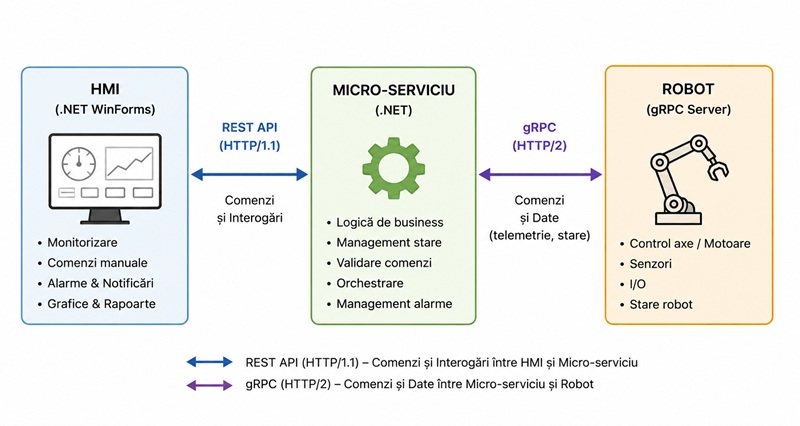
Solution architecture
In this workshop we'll create a REST service that mimics a robot API.
A HMI application will be designed for assuring humans communications with the REST service.
Thus, we will create a .Net solution containing the following projects:
- A Class Library project (the Robot Mock)
- An ASP.NET Core Web API project (the Robot REST API)
- A Windows Forms App project (the HMI desktop client)
Commands:
- Status (HTTP GET)
- Ready, Busy, and Error (with error code and error message)
- Position (HTTP GET)
- Returns a JSON containing the (X,Y) coordinates
- Forward(distance) => Back(distance) = Forward(-distance) (HTTP PUT)
- Movement resolution = 1m
- The robot will work at a speed of 1 m/s (in more advanced scenarios, the speed could also be changed using a dedicated command)
- Right(angle) => Left(angle) = Right(-angle) (HTTP PUT)
- Rotation resolution = 5 deg
- The robot will work at an angular velocity of 5 degrees/s
- Emergency Stop (HTTP PUT)
- The robot will stop any movement as soon as possible
Application Rules:
- While busy, the robot will ignore any movement commands, except for Emergency Stop
- While busy, the robot will respond to get requests (Status & Position)
Nice to have:
- The robot will be equipped with various sensors/devices e.g.:
- obstacle detection (distance to the obstacle and angular size)
- image acquisition
Creating a Human Machine Interface (HMI)
In this section we'll create a Windows Forms "control panel" for the previously described robot mock.Display
- Position and Orientation: the robot will be represented as an arrow on a Picturebox control (nice to have: real-time).
- Coordinates and Status: will be displayed on a multi-line Textbox (nice to have: real-time).
Commands:
- Forward/Back Buttons with a corresponding Textbox for providing the distance parameter:
- As previously mentioned, the service will ignore any command while the robot is busy
- If command accepted, the task duration will be estimated. The status and position will be requested after the estimated time elapsed.
- The graphical representation will be updated accordingly
- Left/Right Buttons with a corresponding Textbox for providing the angle parameter:
- The service will ignore any command while the robot is busy
- If command accepted, the task duration will be estimated. The status and position will be requested after the estimated time elapsed.
- The graphical representation will be updated accordingly
- Emergency Stop Button
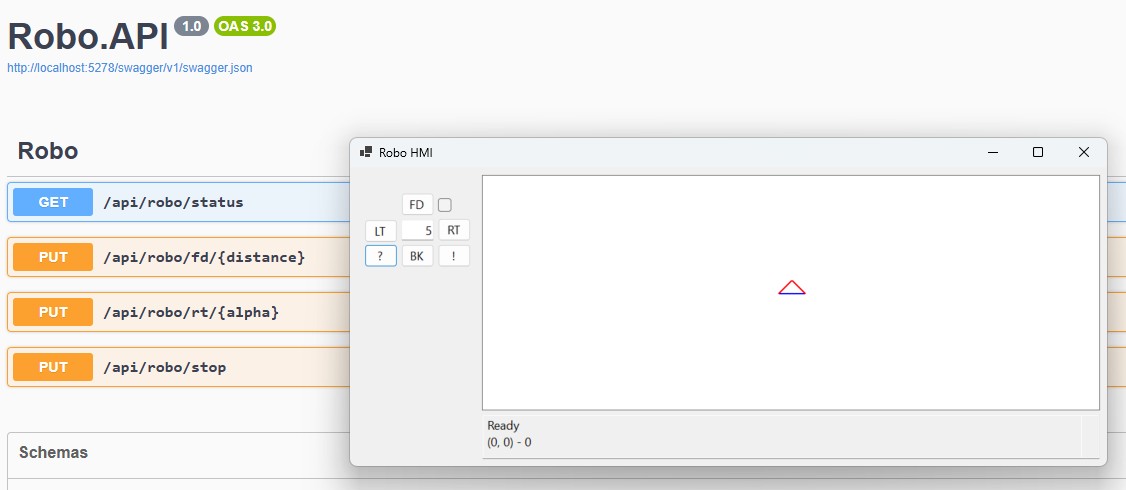
Observation!
The HMI project could also make use of various technologies and frameworks:
- Machine Learning (e.g. the Microsoft ML.Net library) functionalities: the HMI app could receive and analyze images acquired by the robot;
- Generative AI (GenAI) / Large Language Model (LLM) (e.g. OpenAI REST services) for translating human readable text into robot commands;
- Quantum Computing Services for solving classically intractable problems, etc.
Implementation
Robo Mock (Class Library Project)Entities & Helpers:
Robo:
Robo REST API (Web API Project)
The Robo Controller:
Robo HMI (Windows Forms Project)
Model:
REST API Client:
References:
Create web APIs with ASP.NET CoreOverview of gRPC in .NET
SignalR
Machine Learning .NET
.NET Multi-platform App UI
← Home